Tax registration catches many founders off guard. An e-commerce business crosses €75,000 in sales after three months of trading through Shopify. The founder knows VAT registration is now mandatory but has no experience with Irish tax forms.
She downloads the TR1 form Ireland and attempts to complete it. Twenty minutes later, she’s still stuck on the first page.
Here’s the thing about tax registration Ireland: it’s not actually complicated once you understand what goes where. But the forms are designed by tax officials, not entrepreneurs, so they feel unnecessarily confusing.
The TR1 form is what you use to register for tax as a sole trader, partnership, or unincorporated body. It’s a single form that covers income tax, VAT, and employer registration all at once. Get it right and you’re registered within two weeks. Get it wrong and you’re dealing with rejection letters, missing documents, and delays that hold up your entire business.
Whether you’re launching a side hustle that’s taken off, formalising a freelance operation, or starting a partnership, you’ll need to complete this form. And unlike company registration (which uses a different form called TR2), the TR1 is specifically for individuals and partnerships trading under their own names.
Let me walk you through exactly how to complete the TR1 form Ireland correctly the first time, what mistakes cause delays, and when you actually need to register.

What Is The TR1 Form In Ireland?
The TR1 form is the official tax registration form for individuals and partnerships in Ireland. When you submit it to Revenue you’re registering for income tax, and optionally for VAT and PAYE depending on your circumstances.
Think of it as your entry ticket to operating legally as a business in Ireland. Without completing this form, you can’t get a tax reference number, you can’t charge VAT properly, and you can’t run payroll if you hire staff.
Who Needs to Complete a TR1?
You need a TR1 if you’re:
- Starting as a sole trader under your own name
- Forming a partnership with one or more people
- Operating a trust or unincorporated body
- Trading under your own name but needing official tax registration
You don’t need a TR1 if you’re incorporating a limited company. That uses a different form called TR2.
TR1 vs TR2: What’s the Difference?
Here’s a quick comparison:
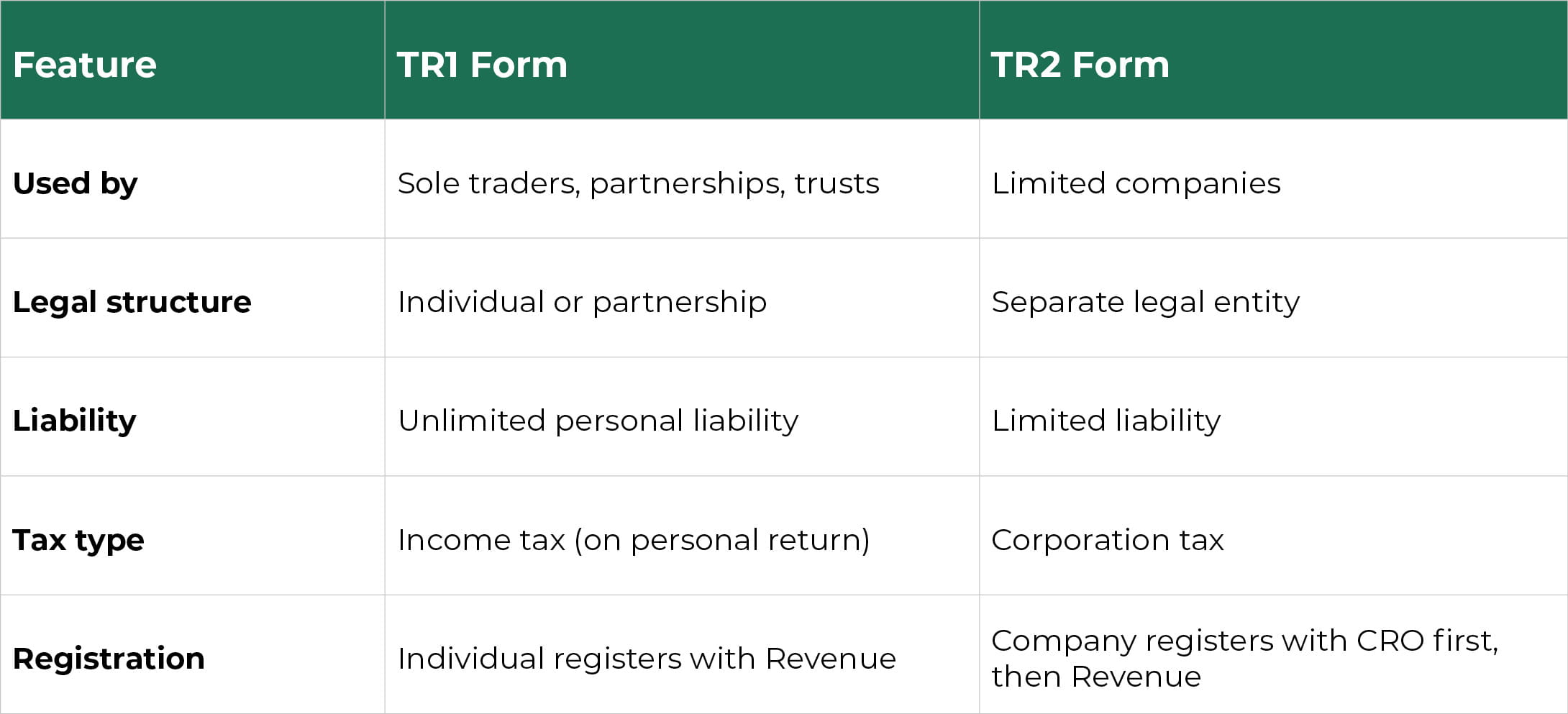
If you’re still deciding whether to operate as a sole trader or incorporate, the TR1 is usually your starting point. You can always incorporate later and switch to company taxation.
Where to Get the TR1 Form
You can download the paper TR1 form directly from the Revenue website, or you can complete the registration online through Revenue Online Service (ROS). The online version is faster and you’ll get your tax number more quickly.
Official Revenue TR1 Form (PDF):
https://www.revenue.ie/en/self-assessment-and-self-employment/documents/form-tr1.pdf
When Do You Need To Register Using A TR1?
Timing matters with tax registration. Register too early and you’re filing returns before you need to. Register too late and you’re potentially trading illegally or missing deadlines.
Starting a Sole Trader Business
The moment you start trading, meaning you’re offering goods or services with the intention of making profit, you should register. Don’t wait until you’ve made your first sale. If you’re setting up, opening business bank accounts, or signing contracts, you’re trading.
In practice, most people register within the first few weeks of starting to trade. Revenue expects registration within a reasonable timeframe after you begin operations.
Forming a Partnership or Trust
If you’re entering into a partnership agreement, register as soon as the partnership is formed. Each partner will have their own tax obligations, but the partnership itself registers using the TR1.
For trusts and unincorporated bodies, registration should happen when the entity is established and begins any taxable activities.
Trading Under Your Own Name
Even if you’re just freelancing under your own name without a fancy business name, you still need to register. It doesn’t matter if you’re called “John Smith Consulting” or just doing business as John Smith, you’re a sole trader and you need a TR1.
Trigger Events: VAT and Employees
Two specific triggers require immediate action:
VAT Threshold: If your turnover reaches €40,000 for services or €80,000 for goods in any 12-month period, you must register for VAT. You should tick the VAT boxes on your TR1 or submit a separate VAT registration if you’re already registered for income tax.
Hiring Employees: The moment you hire your first employee, you need to register as an employer for PAYE and PRSI. This can be done on the TR1 form or separately if you’re already registered.
How To Complete The TR1 Form Correctly The First Time
Right, let’s work through this form section by section. I’ll show you exactly what goes where and flag the common mistakes.
Before You Start
Gather these documents:
- Your PPSN (Personal Public Service Number)
- Proof of identity (passport or driving licence)
- Proof of address (utility bill or bank statement)
- Bank account details for your business
- Partnership agreement if applicable
Section A: Personal and Business Information
This section captures who you are and what you’re doing.
Personal Details:
- Full name (as it appears on official documents)
- Address (your home address if you’re working from home)
- PPSN
- Date of birth
- Contact details (mobile and email—use ones you actually check)
Business Details:
- Trade or profession (be specific: “Web design services” not “IT”)
- Business name if different from your personal name
- Business address if different from your home address
- Date you started or will start trading
Common mistakes here:
- Using nicknames instead of legal names
- Providing a business address you don’t actually use
- Vague descriptions like “consultant” instead of specific services
- Wrong PPSN (double-check this—mistakes here cause immediate rejection)
Section B: Reason for Registration
Tick the appropriate boxes for why you’re registering:
- Income Tax (always tick this for sole traders)
- Partnership (if applicable)
- Trust (if applicable)
- Relevant Contracts Tax (RCT) if you’re a subcontractor in construction or meat processing
- Local Property Tax (LPT) if you’re a letting agent
Most sole traders just tick Income Tax. Don’t over-complicate this section.
Section C: VAT Registration
This is where you register for VAT if needed.
When to register for VAT:
- You’ve exceeded the thresholds (€40,000 services / €80,000 goods)
- You’re voluntarily registering (some businesses do this to reclaim VAT on expenses)
- You’re providing certain services that require VAT registration regardless of turnover
Information needed:
- Expected annual turnover
- Main business activity
- Date you want VAT registration to start from
Common mistakes:
- Not registering when you’ve hit thresholds
- Registering too early when you don’t need to (adds compliance burden)
- Wrong turnover estimates (be realistic based on actual or projected sales)
For e-commerce businesses selling physical goods through Shopify or Amazon, you’ll likely need VAT registration once you’re consistently above €80,000 annually. For SaaS and service businesses, the threshold is €40,000.
Section D: Employer PAYE/PRSI Registration
Complete this section if you’re hiring employees or paying yourself through payroll.
Information needed:
- Number of employees
- Expected annual payroll amount
- Date of first payment
- Whether you’re using payroll software
If you’re using Xero or another cloud accounting platform with payroll functionality, mention this. It helps Revenue understand your setup.
Common mistakes:
- Not registering when you hire your first employee
- Underestimating payroll amounts
- Not understanding that directors of companies need to go through payroll
Section E: Declaration and Signature
Read the declaration carefully. You’re confirming that the information is correct and complete.
Sign and date the form. If it’s a partnership, all partners should sign.
For online submission through ROS: You’ll digitally authenticate instead of physically signing. Make sure you have your ROS credentials set up first.
Supporting Documents
Attach copies (not originals) of:
- Photo ID
- Proof of address
- Bank statement showing your business account details
- Partnership agreement if applicable
Don’t submit:
- Originals (they won’t be returned)
- Irrelevant documents (stick to what’s requested)
- Poor quality scans (make sure everything is readable)

TR1 Form Tips For E-Commerce, SaaS, And Agency Founders
Different business models have different considerations when completing the TR1 form in Ireland.
When TR1 Is the Right Choice vs TR2
Use TR1 if you’re:
- Testing business viability and want minimal setup
- Making under €50,000 profit and don’t need liability protection
- Working solo or with one partner informally
Consider TR2 (company registration) if you’re:
- Planning to raise funding
- Building significant IP or brand value
- Expecting profits above €80,000 where corporate tax becomes advantageous
- Wanting limited liability protection
Many founders start with TR1 and incorporate later once the business is established.
Registering for VAT from Day One
Some scaling businesses voluntarily register for VAT even before hitting thresholds. Why?
- To reclaim VAT on setup costs (equipment, software, inventory)
- To appear more established to B2B clients
- To simplify operations if you’re planning rapid growth
For e-commerce brands buying inventory, early VAT registration can save thousands in reclaimable VAT on stock purchases.
Platform Considerations
Shopify/Amazon sellers: You’ll likely need VAT registration quickly as product sales scale fast. Make sure your registration covers distance selling if you’re shipping to EU countries.
Stripe/payment processors: Having a proper tax registration number helps with verification and payout processes.
SaaS businesses: If you’re selling software subscriptions, understand that digital services have specific VAT rules, especially for international customers.
How Around Finance Supports Digital-First Businesses
We handle tax registration in Ireland for e-commerce, agency, and SaaS founders who want it done right the first time. Our tax services include completing your TR1, liaising with Revenue, and setting up your Xero accounting properly from day one.
What Happens After You Submit The TR1 Form?
You’ve submitted your form. Now what?
Typical Response Time
Paper submission: 2-4 weeks for Revenue to process and issue your tax number.
Online submission through ROS: 1-2 weeks, sometimes faster.
Revenue will write to you with:
- Your tax reference number
- VAT registration certificate (if applicable)
- PAYE registration details (if applicable)
- Instructions for filing returns
How to Check Status
You can check your application status by:
- Logging into ROS (if you submitted online)
- Calling Revenue’s registration helpline
- Waiting for the written confirmation (it will arrive by post)
Don’t panic if you don’t hear back within a week. Revenue processes thousands of these forms, and timeframes vary based on their workload.
What Happens If Revenue Needs More Information
Sometimes Revenue will write asking for:
- Additional proof of identity or address
- Clarification on your business activities
- Supporting documentation you didn’t include initially
Respond quickly with exactly what they’ve requested. Each back-and-forth adds 1-2 weeks to your registration time.
How We Monitor This Process for Clients
When we handle TR1 submissions for clients, we track the application through ROS, follow up proactively with Revenue if there are delays, and sort out any documentation issues immediately. This means clients get registered faster and can start trading without worrying about compliance gaps.
Common TR1 Mistakes That Cause Delays (And How To Avoid Them)
Here’s where most people go wrong:
Registering Too Late
Don’t wait until Revenue contacts you or until you’re filing your first tax return. Register as soon as you start trading. Late registration can result in penalties and back-filing requirements.
Submitting Without Supporting Documents
Revenue will reject incomplete applications. Always include:
- Photo ID
- Proof of address
- Bank details
- Partnership agreement if relevant
Check twice before submitting.
Confusing TR1 vs TR2
If you’ve already incorporated a company, you need TR2, not TR1. The TR1 is only for sole traders and partnerships.
Forgetting to Register for VAT or PAYE When Needed
If you’ve hit VAT thresholds or hired staff, you must register. Forgetting to tick these boxes on your TR1 means you’ll need to submit separate applications later.
Typos or Errors in Personal Details
Wrong PPSN, misspelled names, incorrect addresses, these all cause rejections. Double-check every field before submitting.
Not Using ROS Properly
If you’re submitting online, make sure you understand how ROS works. The interface isn’t intuitive, and it’s easy to submit incomplete applications by mistake.
Need Help Registering For Tax In Ireland?
Look, completing a TR1 form Ireland isn’t rocket science, but it does need to be done right. One mistake can delay your registration by weeks, which means you can’t trade legally, can’t charge VAT properly, and can’t hire staff.
We handle tax setup and registration for scaling businesses across Ireland. Whether you’re launching a Shopify store, building a SaaS product, or starting a marketing agency, we’ll get you registered properly so you can focus on building your business.
Contact us to discuss your tax registration needs. We’ll handle the TR1 submission, liaise with Revenue on your behalf, and set up your accounting systems properly from day one.
FAQs
What is the TR1 form used for in Ireland?
The TR1 form Ireland is used to register for tax as a sole trader, partnership, trust, or unincorporated body. It covers income tax registration and can also be used to register for VAT and PAYE/PRSI if you need them. It’s your main tax registration form if you’re not operating as a limited company.
What’s the difference between TR1 and TR2 forms in Ireland?
TR1 is for sole traders, partnerships, and trusts, individuals trading under their own names. TR2 is for limited companies that are separate legal entities. If you’ve incorporated a company with the CRO, you need TR2. If you’re operating as yourself or with partners, you need TR1.
Can I complete the TR1 form online through Revenue?
Yes. You can complete the TR1 form Ireland online through Revenue Online Service (ROS). The online version is faster than paper submission and you’ll typically receive your tax number within 1-2 weeks instead of 2-4 weeks. You’ll need to set up ROS credentials first if you don’t already have them.
How long does tax registration take after submitting a TR1 form?
Paper submissions take 2-4 weeks. Online submissions through ROS take 1-2 weeks. If Revenue needs additional information or documentation, add another 1-2 weeks for each round of correspondence. The fastest registrations happen when you submit online with all required documents included from the start.
Do I need to register for VAT or PAYE when filling out the TR1 form?
You need to register for VAT if your turnover exceeds €40,000 (services) or €80,000 (goods) in any 12-month period, or if you’re voluntarily registering. You need to register for PAYE if you’re hiring employees or paying yourself through payroll. Both can be done on the TR1 form by ticking the appropriate boxes and completing the relevant sections.